
For Any Query
If your team still prints thick board packs, couriers them to directors and chases signatures by phone, you already know how much time meetings can eat before they even begin. Paperless meeting management software was built to fix exactly that. It moves your agendas, documents, discussions and decisions into one secure digital space.
In this guide, you will learn what this software is, which features matter most, how paperless board meeting software works, and how to choose the right option for your organisation in Pakistan. It is written for managers, executives, company secretaries and board members who want a practical answer rather than a sales pitch. If you are also planning wider business technology upgrades, this guide will help you see where meeting software fits in
What Is Paperless Meeting Management Software?
Paperless meeting management software is a digital platform that lets organisations prepare, run and follow up on meetings without printed documents. It handles agendas, meeting papers, notes, voting, approvals and action items in one place, usually through a web portal or mobile app.
Who uses paperless meeting software?
Any group that holds regular, document-heavy meetings can benefit:
- Boards of directors and board committees
- Executive and management teams
- Universities, hospitals and nonprofits
- Banks, financial institutions and listed companies
- Government and semi-government bodies
Boards are the most common users, which is why the term paperless board meeting software comes up so often. A paperless board meeting solution is simply a version of this software built around governance needs such as confidentiality, formal minutes and director voting.
7 Essential Features to Look for in Paperless Meeting Management Software
Not every platform offers the same tools. These seven features separate a useful system from one that people stop using after a month.
1. Secure document distribution
Board papers often contain financial results, legal matters and strategy. Look for encryption, role-based access and the ability to withdraw a document if it was shared by mistake.
2. Agenda builder and templates
Good software lets you create an agenda once, reuse it, and link each item to its supporting papers. This saves your company secretary hours every cycle.
3. Annotation and note-taking tools
Directors should be able to highlight, comment and write private notes directly on documents. Private notes should stay private and not be visible to administrators.
4. Offline access
Connectivity can be unpredictable, so this matters in Pakistan. Offline access lets members download papers beforehand and read them during travel or a power outage.
5. E-voting and e-signatures
Approving resolutions between meetings becomes much faster when members can vote and sign digitally. Check that the system records an audit trail of who voted and when.
6. Minutes and action tracking
The best paperless meeting software turns decisions into assigned tasks with deadlines. That way, nothing discussed on Monday is forgotten by Friday.
7. Integration and device support
Your tool should work on laptops, tablets and phones, and connect with calendars and email. Even the finest software depends on reliable hardware, so many organisations review their devices first. A dependable business machine, such as the models covered in this guide to HP laptop prices in Pakistan between 20,000 and 30,000, can handle meeting portals without trouble for everyday administrative staff.
How Does Paperless Board Meeting Software Work?
Paperless board meeting software works by giving administrators a central dashboard to upload papers, invite members, and publish an agenda, while directors access everything through a secure login on their own device. After the meeting, minutes and actions are stored in the same system.
A typical workflow
- Preparation: The company secretary creates the meeting, builds the agenda and uploads papers.
- Notification: Members receive an alert that the board pack is ready.
- Review: Directors read, annotate and ask questions before the meeting.
- Meeting: Everyone follows the agenda on screen, votes if needed and records decisions.
- Follow-up: Minutes are approved, and tasks are assigned and tracked.
Where is the data stored?
This is a fair question. Some platforms use cloud hosting, while others offer on-premise or hybrid deployment. Ask any vendor where data is stored, who can access it and how backups are handled. This is especially important for regulated sectors.
Benefits of Using a Paperless Board Meeting Solution
The advantages are practical, and most organisations notice them within a few meeting cycles.
Faster preparation
Building a board pack manually can take days. A digital system reduces that to hours, because documents are uploaded once and distributed instantly.
Better security
Emailed attachments and printed copies can be forwarded, lost or left in taxis. A paperless board meeting solution keeps documents behind controlled access, with logs showing who opened what.
Lower printing and courier costs
Printing, binding and delivery add up over a year, especially for boards with many members. Reducing paper is also a small but real step toward environmental goals. If your office is rethinking its hardware spend, you may find this overview of printing technology and costs in Pakistan useful for understanding where print budgets actually go.
Better decisions
When directors receive papers earlier and can annotate them, discussions are sharper. Less time goes to reading aloud, and more goes to actual decisions.
Clearer accountability
Action tracking means every task has an owner and a due date, so follow-up stops depending on memory.
Paperless Meeting Software vs Traditional Meetings
The main difference is that traditional meetings rely on printed papers and manual follow-up, while paperless meeting software centralises documents, voting and tasks digitally.
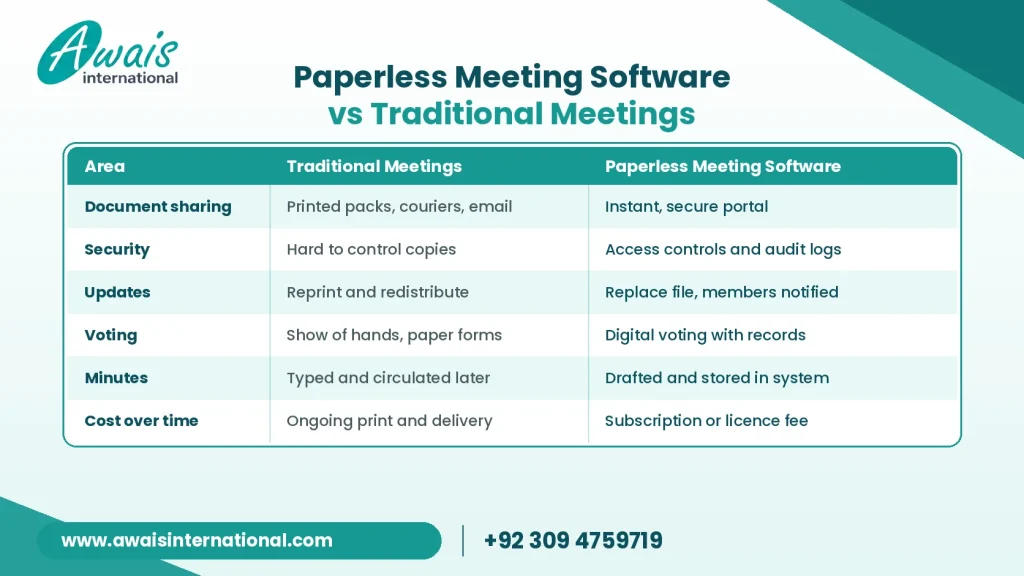
Traditional methods are not useless. Small teams with very few documents may manage fine on email and shared folders. But once meetings involve confidential papers, multiple committees or regulatory expectations, a dedicated platform usually pays off in time and control.
How to Choose the Right Paperless Meeting Management Software
To choose the right paperless meeting management software, match its features to your meeting types, check its security, test how easy it is for older or less technical members, and confirm support options before committing.
Start with your real needs
List who attends, how many meetings you hold and what documents you handle. A board with eight directors has different needs from a company running dozens of departmental meetings.
A practical checklist
- Does it support the security standards your industry expects?
- Is it simple enough for every member to use without training?
- Does it work offline and on mobile devices?
- Can it handle minutes, voting and action tracking?
- Is local or responsive support available?
- Are pricing and contract terms transparent?
- Can you run a trial or demo with real documents?
Check your devices and infrastructure
Software is only as reliable as the equipment running it. Board members need tablets or laptops, and the office needs a stable network. Many businesses refresh their staff machines at the same time, and options such as the ones in this guide to Dell laptop prices in Pakistan can help you plan the hardware side of a digital rollout.
Think about physical security too
Digital security does not stop at passwords. Boardrooms and server rooms also need sensible physical protection. If you are reviewing your premises, this article on WiFi CCTV camera prices in Pakistan explains what to look for in modern surveillance.
Plan the rollout
Start with one committee, collect feedback, then expand. Name a champion inside the team, usually the company secretary, who can help colleagues get comfortable. A short training session often makes the difference between adoption and abandonment.
Frequently Asked Questions
What is paperless meeting management software?
It is a digital platform that handles agendas, documents, notes, voting and follow-up tasks for meetings, so teams no longer need printed papers.
Is paperless board meeting software secure?
Reputable platforms use encryption, access controls and audit trails. Security still depends on the vendor, your settings and good user habits, so always review a provider’s security practices before signing.
Can paperless meeting software work without internet?
Many platforms allow members to download documents for offline reading. Check this feature specifically, as it varies between products.
Do directors need special devices?
Usually not. Most systems run on standard laptops, tablets and smartphones. If your team is reviewing hardware, HP laptop options for office use are worth comparing against your needs.
How long does it take to adopt a paperless meeting solution?
It depends on the size of your organisation, but starting with a pilot group often gets a team comfortable within a few meeting cycles.
Conclusion
Paperless meeting management software replaces the printing, couriering and chasing that slow meetings down. The strongest platforms combine secure document sharing, easy agendas, annotation, offline access, voting and action tracking. Whether you run a board or a busy management team, the right paperless board meeting software can make your meetings faster, safer and more productive.
Before you decide, define your needs, test a few options, and make sure your devices and network can support the change. If you are upgrading your business technology, explore the range of IT solutions at Awais International and see how a reliable technology partner can support your move toward smarter, paper-free work
Get a Free Quote
Fill in the form our team will get back to you with the next steps.
+92 309 4759719
+92 324 449 8948
info@awaisinternational.com
Office # 915, 9th Floor, Al-Hafeez Executive, Block C3, Gulberg 3, Lahore, Punjab, Pakistan