
FOR ANY QUERY
OFFICE NUMBER
+92 324 4498948
+92 301 4232009
mail us
info@awaisinternational.com
Location
Office # 915, 9th Floor, Al-Hafeez Executive, Block C3, Gulberg 3, Lahore, Punjab, Pakistan.
Lenovo ThinkPad Price in Pakistan – Complete Buying Guide
Honestly, if you’ve been lenovo thinkpad laptop shopping in Pakistan for more than five minutes, someone has probably already told you to “just get a ThinkPad.” And here’s the thing — they’re not wrong.
ThinkPads have this weird reputation in the tech world where people who own them become almost evangelistic about them. You’ll find engineers who’ve used the same ThinkPad for six or seven years and refuse to replace it. You’ll find business owners who bulk-buy them for their entire teams because they’re tired of dealing with warranty claims on cheaper machines. That kind of word-of-mouth doesn’t happen by accident.
But the ThinkPad lineup is also confusing if you’re coming in fresh. There’s the X1 Carbon, the T480, the T14, different processor tiers, new versus refurbished options — and if you don’t know what separates them, it’s easy to either overspend or end up with the wrong machine entirely.
This guide is meant to sort all of that out. By the end, you’ll know exactly which ThinkPad makes sense for your situation, and what to actually look for when you’re ready to buy in Pakistan.
Why So Many People in Pakistan Keep Coming Back to ThinkPads
Let’s be real — Pakistan is a tough environment for laptops. Power fluctuations, dusty conditions, long work hours, and the kind of rough handling that comes from commuting across cities every day. A lot of consumer laptops don’t hold up. ThinkPads, for the most part, do.
Lenovo puts ThinkPads through what they call MIL-SPEC testing — military-grade durability tests that cover temperature extremes, humidity, vibration, and drop resistance. Whether that fully translates to the real world is debatable, but anecdotally? These machines do tend to survive things that would crack or fry other laptops.
Beyond durability, the keyboard is genuinely something special. It’s one of those things that’s hard to explain until you’ve actually used one — there’s a depth and feedback to the keys that most laptop keyboards just don’t have. For anyone who types a lot (and in business, that’s most people), it makes a noticeable difference over a full workday.
Security features are built in rather than bolted on as afterthoughts. Fingerprint readers, IR cameras for face login, TPM chips for data encryption — these aren’t extras on a ThinkPad, they come standard. For businesses handling client data or sensitive financial information, that matters.
And then there’s resale value. A ThinkPad holds its worth better than most laptops in Pakistan’s secondary market, which means buying one isn’t just a purchase — it’s a reasonably safe investment.
The ThinkPad Family — What Each Tier Actually Means
Before getting into specific models, it helps to understand that ThinkPad is a whole product family, not a single laptop. Lenovo has positioned different series for different users, and picking the wrong tier means either wasting money or ending up frustrated with something underpowered.
Entry-level ThinkPads are usually older configurations — think Core i3 or early i5 chips with 8GB RAM and basic SSD storage. These are mostly sold as refurbished units in Pakistan and are a reasonable choice if your work is genuinely light. Document editing, spreadsheets, email, basic web browsing — they handle all of that fine. Don’t expect much beyond that.
Mid-range ThinkPads are where the lineup really starts to shine. The T-series — specifically the T480 and T14 — falls here. These machines are built for real business use, with processors and memory configurations that handle genuine workloads. They’re also the models you’ll see most in Pakistani corporate offices, and for good reason.
Premium ThinkPads are a different story entirely. The X1 Carbon is Lenovo’s flagship business ultrabook, and it’s priced and built accordingly. Carbon fiber chassis, ultra-light weight, top-tier display options. If you want the absolute best ThinkPad experience and budget isn’t the primary constraint, this is where you end up.
Lenovo ThinkPad X1 Carbon — The One Professionals Argue Over
There’s always a debate when the X1 Carbon comes up. Half the room says it’s the best business laptop money can buy. The other half says you’re paying a premium for the name and the carbon fiber, and the T14 does 90% of the same job for less.
Both sides have a point, honestly.
What the X1 Carbon does exceptionally well is portability without compromise. It weighs around 1.13 kg, which sounds like a number until you’ve carried a heavier laptop through three meetings and a flight and your shoulder is done. The build is magnesium and carbon fiber — it doesn’t flex, doesn’t creak, and has a solidity to it that heavier laptops somehow don’t match. Display options go up to a 2.8K OLED panel that’s genuinely beautiful. Battery regularly hits 12 to 15 hours in real use. Intel Core i7 vPro processors, up to 32GB RAM, fast NVMe storage.
For a senior executive, a management consultant, or anyone whose laptop goes with them everywhere every day — the ThinkPad Carbon X1 is a legitimate tool, not just a status symbol. You feel the difference when you’re using it.
For someone who sits at a desk most of the day? The argument for the X1 Carbon gets thinner. The T14 at that point is a smarter call.
Lenovo ThinkPad T480 — A Laptop That Refuses to Become Irrelevant
The T480 shouldn’t still be this popular. It came out years ago. There are newer models with faster chips, better displays, and more modern ports. And yet — walk into any IT market in Lahore or Karachi and the T480 is still moving.
The reason is the dual battery system. The T480 has both an internal battery and a removable external one. You can swap that external battery while the laptop is running — no shutdown, no losing your work, just pull one out and slide another in. For someone who spends long days away from power sockets, that’s genuinely useful in a way that no amount of marketing copy about “all-day battery life” replicates.
Beyond that, the Lenovo Thinkpad 480 is upgradeable in ways newer ThinkPads aren’t. RAM slots that accept up to 32GB. Replaceable storage. Real USB-A ports alongside USB-C. A build quality that has held up through years of daily use for thousands of users.
It’s not cutting-edge. It doesn’t pretend to be. What it is, is dependable — and in Pakistan’s market, dependable tends to win.
Lenovo ThinkPad T14 — When You Want Modern Without Going Premium
The T14 picks up where the T480 left off, and it does most things better — just not everything.
Processor generations jump significantly here, from the T480’s 8th-gen Intel chips to 10th through 13th generation in the T14 depending on which version you buy. RAM support climbs to 48GB DDR5. Display quality improves with FHD+ and 2.8K options. Thunderbolt 4 shows up, which matters if you use external monitors or high-speed storage. The cooling system is better tuned, so it runs quieter under sustained workloads.
What it gives up is the hot-swap battery. That removable external battery that made the T480 special — gone. The T14 has a built-in battery only. For most users that’s fine. For the specific group of people who loved that T480 feature, it’s a genuine tradeoff worth thinking about.
T14 vs T480 — Honest Comparison
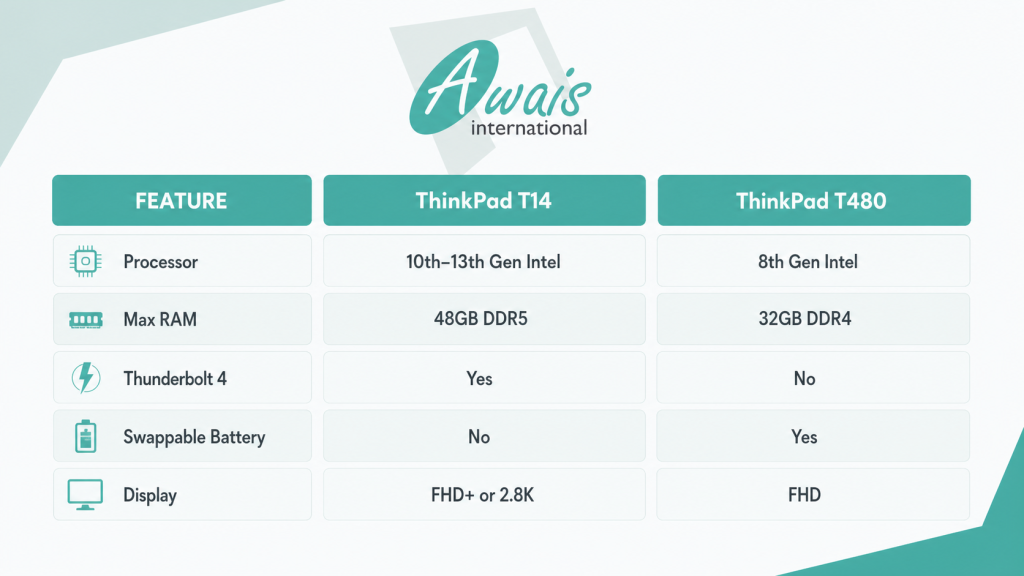
The simple version: if you’re buying a laptop you plan to use for the next four or five years, the T14’s modern hardware justifies the choice. If budget is tight and you need something solid right now, the T480 is nowhere near obsolete.
ThinkPad i5 — What Most Buyers Actually Need
There’s a tendency when buying a laptop to assume more is always better. Better processor, more RAM, higher storage — and before you know it, you’ve spent significantly more than you needed to for specs that sit mostly idle.
For the majority of ThinkPad buyers in Pakistan, a configuration does everything comfortably. Office applications, web browsing, video calls, email, moderate coding, financial software — an i5 with 16GB RAM handles all of it without any strain.
Where you actually need to step up to an i7 is if you’re running virtual machines, doing video editing, working with large datasets, or using design software regularly. For everything else, the i5 is the sensible, honest answer.
The sweet spot most professionals land on: a T480 or T14 with a Core i5, 16GB RAM, and a 512GB SSD. Fast enough for real work, durable enough to last, and reasonably priced compared to higher configurations.
X1 Carbon vs T14 — The Decision Most Business Buyers Face
These two come up together constantly, and the honest answer is that it depends entirely on how you work.
The Lenovo thinkpad X1 Carbon wins if you’re constantly moving. Lighter bag, better display, premium materials — if your laptop goes to client meetings, conferences, and flights every week, the X1 Carbon pays for the premium in reduced fatigue and more professional impressions. The OLED display option is also genuinely excellent for anyone who looks at a screen for eight-plus hours daily.
The T14 wins if you mostly work from a fixed location or move occasionally. Newer processor generations give it an edge in raw performance. It connects to docks and external monitors without issues via Thunderbolt. And you spend less, which — when it comes to a work tool — is a reasonable consideration.
Neither is a bad laptop. The X1 Carbon is better in specific scenarios. The T14 is better value for most scenarios. Knowing which category you fall into makes the decision straightforward.
ThinkPads for Students — What Actually Works
Students need something different from what a corporate executive needs. Durability to survive bag life. Battery to get through a full day. Performance enough for coursework without overspending on power they don’t need.
The T480 is a strong student pick for exactly those reasons. It’s tough, the keyboard makes assignment writing less painful, and the battery situation — especially with the dual battery option — means you’re not constantly hunting for a socket between lectures.
For engineering, CS, or data science students running heavier software — compilers, simulation tools, machine learning environments — stepping up to a T14 with 16GB RAM makes a real difference. The extra processing headroom shows when you’re running multiple tools simultaneously.
If you’re also comparing with HP options, it’s worth checking out the HP Spectre x360 or browsing HP laptops in the more affordable range depending on your budget.
ThinkPads for Business Professionals Matching the Model to the Role
Not every professional needs the same machine, and Lenovo ThinkPad‘s lineup actually maps reasonably well to different professional profiles.
Executives and frequent travelers — X1 Carbon, no debate. The weight and build quality make daily travel genuinely less exhausting.
Developers and analysts — T14 with i7 and 16GB or 32GB RAM. The Thunderbolt port, modern processor, and RAM headroom handle development environments and data tools without slowing you down.
Finance and operations teams — T480 with i5 or i7 and 16GB RAM. Solid for spreadsheet-heavy work, reliable enough to run for years, and practical for businesses buying multiple units at once.
For HP alternatives in the professional space, HP authorized partners across Pakistanand HP authorized dealers in Lahore are worth checking out. And if gaming is part of the picture, HP’s gaming laptop lineup has expanded considerably.
Refurbished ThinkPads in Pakistan — The Smart Buy Guide
Buying refurbished is how a lot of people in Pakistan get access to machines that would otherwise be out of budget — and with ThinkPads specifically, refurbished often makes a lot of sense because the build quality means these laptops age much better than cheaper alternatives.
That said, the refurbished market in Pakistan is uneven. Some sellers are careful and transparent. Others aren’t. A few things separate a good refurbished ThinkPad from a frustrating one:
Grade A or Grade A+ certification means the unit has been inspected, cleaned, and tested. Any seller who can’t tell you the grade should be treated with caution.
Battery health above 80% is the practical threshold. Below that, you’ll be hunting for a charger far too often.
SSD storage only. If a seller is offering a ThinkPad with a spinning hard drive, that’s a machine configured for a decade ago. Insist on SSD.
Seller warranty, even a short one. Thirty days minimum. It tells you the seller is confident in what they’re selling.
Test everything before you complete the purchase — keyboard, trackpad, all ports, display brightness and colors, webcam, fingerprint reader. ThinkPads are built to last, but individual refurbished units can have specific issues, and you want to know before you leave the shop.
Where to Actually Buy a ThinkPad in Pakistan
The biggest risk in Pakistan’s laptop market isn’t paying too much — it’s buying from the wrong source and ending up with a misrepresented product and no recourse.
Awais International is one of Pakistan’s most established IT retailers, dealing in both new and certified refurbished business laptops with genuine after-sales support. For businesses buying in volume or individuals who want the assurance of buying from a proper retailer rather than a random market stall, it’s a solid starting point.
If HP products are also on your shopping list alongside ThinkPads, HP authorized partners in Lahore and the broader HP authorized partner network in Pakistan are worth bookmarking. For printers alongside your laptop purchase, the HP printer guide covers the main options currently available.
Frequently Asked Questions
Is a Lenovo ThinkPad actually worth the money in Pakistan compared to cheaper alternatives?
For casual use — streaming, browsing, light documents — probably not, honestly. A cheaper laptop does those things fine. But if you’re relying on this machine for serious work, the ThinkPad’s durability, keyboard quality, and longevity make the investment pay off over time. A machine that lasts five or six years at full functionality costs less in the long run than replacing a cheaper laptop twice.
X1 Carbon or T14 — what should most buyers choose?
For most professionals working mostly from an office or home setup, the T14 is the more sensible choice. It has newer hardware, handles demanding workloads, and costs less. The X1 Carbon earns its premium specifically for people who travel constantly and feel the difference in a lighter bag every single day.
Is the T480 genuinely still good, or is it just cheap?
It’s genuinely still good. The hot-swap battery alone is a feature that matters in practice, and the build quality has held up for thousands of users over years of daily use. It’s not a compromise pick — it’s a deliberate choice that makes sense for certain users and budgets.
What’s the right RAM amount for a ThinkPad in Pakistan?
16GB is the honest minimum for any professional use today. 8GB feels limiting quickly once you have a few browser tabs, an email client, and a spreadsheet open simultaneously. 32GB makes sense for developers or anyone running virtual machines. For most other users, 16GB hits the sweet spot.
Where’s the safest place to buy a ThinkPad in Pakistan?
Stick with established retailers who can give you clear product grades, battery health information, and at least a short warranty. Awais International is a reputable option with genuine after-sales support rather than a “sold as seen” approach.
Final Word
ThinkPads have earned their reputation the old-fashioned way — by being reliable enough that people recommend them to friends, and durable enough that those friends come back years later saying the recommendation was right.
The X1 Carbon, the T14, the T480 — each one makes sense for a different kind of buyer. Match the model to how you actually work, not to the highest spec you can justify, and you’ll end up with a laptop that genuinely serves you well for years.
Ready to find yours? Head over to Awais International and see what’s currently available — with proper support from a team that actually knows what they’re selling.