
For Any Query
If you work on a laptop or desktop in Pakistan, chances are it runs on Microsoft Windows. It powers home PCs, university labs, shops, banks and thousands of growing businesses. Still, people keep asking the same things. Which version should I use? How do I install it without damaging my data? Can I really get Word and Excel for free?
This guide answers those questions in plain language. You will learn what Windows does, what Windows 10 offers, how to install it safely, and how to get Office apps the legitimate way.
What Is Microsoft Windows?
Microsoft Windows is an operating system developed by Microsoft. It controls your computer’s hardware, runs your programs and gives you a screen where you can manage files, apps and the internet.
A computer without an operating system is just a box of parts. Windows is the layer that lets your keyboard, screen, printer and storage work together with the software you use every day. It has been around since the 1980s and has gone through many versions, including Windows 95, XP, 7, 8, 10 and 11.
Why Microsoft Windows Is So Widely Used
- Software support: Most accounting, design and business programs are built for Windows first.
- Hardware choice: It runs on almost every laptop and desktop brand, at every budget.
- Easy to learn: The Start menu, taskbar and File Explorer feel familiar to most people.
- Business tools: Microsoft Windows includes user controls, security settings and remote management that companies depend on.
Microsoft Windows 10: Features and System Requirements
Microsoft Windows 10 is still installed on a huge number of computers across Pakistan. Many offices keep using it because it is stable and runs well on older machines.
Main Features of Microsoft Windows 10
- Start menu and taskbar: Quick search and easy access to your apps.
- Virtual desktops: Keep work, study and personal tasks on separate screens.
- Microsoft Defender: Built-in protection against viruses and malware.
- Snap layouts: Arrange windows side by side for faster multitasking.
- OneDrive sync: Reach your files from any device.
Windows 10 System Requirements
- Processor: 1 GHz or faster
- RAM: 1 GB (32-bit) or 2 GB (64-bit)
- Storage: 16 GB (32-bit) or 20 GB (64-bit)
- Graphics: DirectX 9 compatible
- Display: 800 x 600 or higher
These are the minimum numbers. For smooth daily use, 4 GB of RAM and an SSD make a big difference.
Windows 10 has also reached the end of its regular support period, so it no longer receives free security updates. Home users can continue with careful browsing and good antivirus software. Businesses that handle customer or financial data should plan a move to Windows 11.
Windows 10 vs Windows 11
Windows 11 has a cleaner look and stronger built-in security, but it needs newer hardware, including TPM 2.0 and a compatible processor. If your current computer can’t meet those requirements, stay on Windows 10 for now. When you are ready to upgrade, choose a device that supports Windows 11 and pair it with a genuine license.
How to Install Microsoft Windows Safely
A careless installation can lead to lost files, malware or license trouble. Follow these steps to avoid problems:
- Back up your data to an external drive or cloud storage.
- Check your hardware against the requirements above.
- Download the installation tool only from Microsoft’s official website.
- Create a bootable USB using a drive with at least 8 GB of space.
- Boot from the USB by pressing F2, F12 or Esc while the PC starts.
- Follow the setup screens and choose your language, drive and edition.
- Run Windows Update and install your drivers once setup is complete.
Why Cracked Windows Copies Are a Bad Idea
Pirated copies are easy to find in local markets, but they come with real risks. Many carry hidden malware, block security updates and expose your data. For a business, they can also cause legal and audit trouble. A genuine license costs more at first, but it protects your files, your clients and your reputation. If you are unsure where to buy, always go through an authorized partner.
Microsoft Office Free Download for Windows 10
This is one of the most searched topics among Windows users, so let’s be clear about what “free” actually means.
Microsoft does not give away the full desktop version of Office permanently. You can use the free web versions of Word, Excel and PowerPoint with a Microsoft account, or try Microsoft 365 through an official trial.
Your legitimate options for a Microsoft Office free download for Windows 10 are:
- Office on the web: Free browser apps with core features.
- Official trial: A limited-time Microsoft 365 trial with full desktop apps, when Microsoft offers one.
- Mobile apps: Basic editing on phones and tablets.
- Paid license: A one-time purchase or subscription for complete desktop apps.
Before you click any download button, read Microsoft Office: Things to Know Before You Download. It will help you avoid fake installers and unsafe websites.
Microsoft Word Free Download for Windows 10
Word is free to use in your browser at office.com with a Microsoft account. It handles letters, resumes, reports and assignments without trouble, and you can share a file and edit it with others at the same time.
For offline work, mail merge, advanced formatting and referencing tools, you need the desktop app, which comes with a paid Office license or Microsoft 365 plan.
Microsoft Excel Free Download for Windows 10
Excel Online is free and works well for simple tables, formulas, charts and budgets. It does not support every advanced tool, such as large data models or complex macros.
If you manage stock, payroll or monthly sales reports, the desktop app is the safer choice because it runs offline and handles bigger files with ease.
Microsoft Office Online vs Desktop Apps
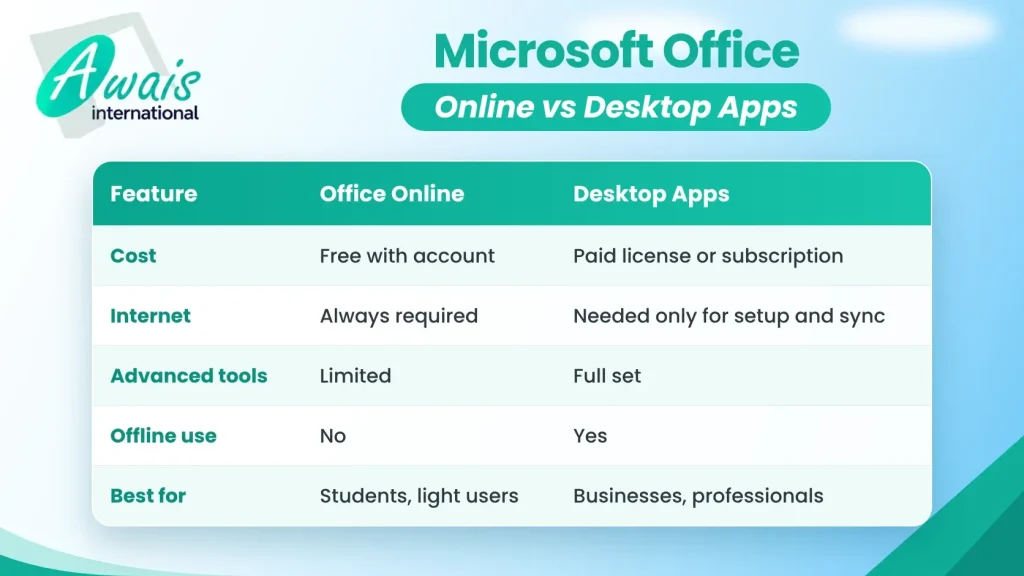
Which should you pick? If you write the occasional document, the online version is enough. If you work with large spreadsheets or confidential files, choose desktop apps. In Pakistan, where load-shedding and internet drops are common, offline access is often worth paying for.
For regular updates, cloud storage and Teams in one plan, see Microsoft 365: A Practical Guide.
Windows 10 Compatibility with Microsoft Office
Microsoft Windows 10 works with most current Office versions. Very old versions may show warnings or miss important fixes. Keep these points in mind:
- Match the bit version. Use 64-bit Office on 64-bit Windows, especially for large Excel files.
- Check your RAM. Aim for at least 4 GB.
- Keep Windows updated. Updates fix bugs that can affect Office apps.
- Avoid mixing versions. Old and new Office versions on one PC often cause errors.
Common Windows Installation and Download Problems
“This PC Can’t Run Windows” Error
This usually means your hardware doesn’t meet the requirements. Check the processor, RAM and storage. For Windows 11, also confirm that TPM and Secure Boot are enabled in BIOS.
Installation Freezes or Restarts
A faulty USB drive or a corrupted download is the usual cause. Rebuild the bootable USB with a different drive and download the installer again from Microsoft.
Product Key Not Working
Make sure the key matches your edition, such as Home or Pro. Retail and volume keys are not interchangeable. If a purchased key fails, contact the seller immediately.
Office Won’t Activate
Sign in with the Microsoft account linked to your purchase. A “non-genuine” warning usually means the copy is unlicensed.
Windows Feels Slow After Installing
Update your drivers, disable unnecessary startup programs and consider an SSD. Old hard drives are the most common reason for slow performance.
Genuine Microsoft Software for Businesses
For a company, Windows and Office are part of how you protect data and keep staff productive. Genuine licensing gives you:
- Security updates that keep your network safer
- Official support from Microsoft and authorized partners
- Audit protection and fewer legal risks
- Volume pricing for teams of any size
- Simple management across many devices
The seller matters as much as the software. Awais International is a Microsoft Authorized Partner in Pakistan, so you receive authentic licenses, proper invoices and local after-sales support.
Choosing the Right Hardware for Windows
Software runs only as well as the hardware under it. For business use, look for:
- An Intel Core i5 or AMD Ryzen 5 processor, or better
- 8 GB of RAM or more
- A 256 GB SSD at minimum
- A battery that handles long meetings and power cuts (for laptops)
- Windows 11 support for long-term security
Browse our business laptops that arrive ready for Windows and Office, and equip your whole team in a single order.
Frequently Asked Questions
What is Microsoft Windows used for?
Microsoft Windows manages your computer’s hardware and lets you open apps, organize files, browse the web and connect to printers and networks. It is the most widely used desktop operating system in the world.
Is Microsoft Windows 10 still safe to use?
It still works, but it no longer gets free security updates. Personal users should be extra careful with downloads and keep antivirus active. Businesses should move to Windows 11 or a supported setup.
Can I get a Microsoft Word free download for Windows 10?
You can use Word free in your web browser with a Microsoft account. The full desktop version needs a paid license, subscription or an official trial when available.
Is Microsoft Excel free for Windows 10?
Excel Online is free with a Microsoft account and covers basic spreadsheet work. Advanced features and offline use need the desktop version.
How do I check if my Windows is genuine?
Open Settings, go to Update & Security, then Activation. If it says Windows is activated with a digital license or product key, your copy is valid.
Conclusion
Microsoft Windows remains the backbone of everyday computing in Pakistan. Whether you are a student who needs free Word access, a freelancer working in Excel, or a company setting up a full office, the advice is the same: choose genuine software, pair it with suitable hardware and install it carefully.
Ready to set up your team with genuine Microsoft software? Contact Awais International for authentic Windows licenses, Office solutions and business-ready laptops, backed by trusted local support.
Get a Free Quote
Fill in the form our team will get back to you with the next steps.
+92 309 4759719
+92 324 449 8948
info@awaisinternational.com
Office # 915, 9th Floor, Al-Hafeez Executive, Block C3, Gulberg 3, Lahore, Punjab, Pakistan