
FOR ANY QUERY
Choosing office equipment in Pakistan is rarely simple. Prices change often, stock moves fast, and a wrong choice can leave you paying for toner and repairs for years. If you have already compared options in our guide to the best 3D printer in Pakistan, you know how much a careful comparison saves. The same logic applies to everyday office printing. The HP LaserJet Pro M1132 Multifunction Printer has been a reliable choice for small offices, shops and home businesses for years. In this guide you will learn what it does, how to think about its price, how to install the driver, and what to check before you pay.
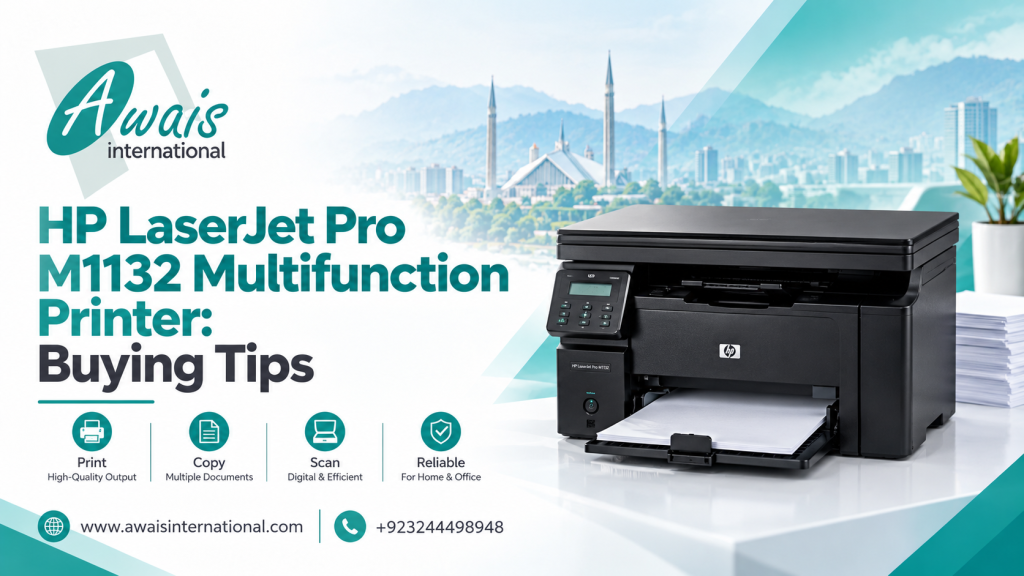
HP LaserJet Pro M1132 Multifunction Printer Overview
The HP LaserJet Pro M1132 is a compact monochrome laser printer that combines three jobs in one machine: printing, copying and scanning. It prints black-and-white documents only, which suits most invoices, letters, reports, forms and challans.
Many Pakistani buyers like it because it is simple. It has no complicated menus and no heavy ongoing costs. You load paper, press print, and it gets on with the job. It is also small enough to sit on a normal office desk or a shop counter.
Quick answer: The HP LaserJet Pro M1132 is a black-and-white, all-in-one laser printer for small offices and home businesses that need reliable print, copy and scan functions in one device.
Key Features and Multifunction Capabilities
Here is what the HP LaserJet Pro M1132 Multifunction Printer series offers in everyday use.
Printing
- Prints at speeds of up to around 18 pages per minute on A4 paper
- Sharp text at 600 x 600 dpi resolution, good for official documents
- Quick first-page output, so single-page jobs do not keep you waiting
Copying
- Flatbed copier for ID cards, certificates and single sheets
- Reduce and enlarge options, plus multiple copies in one go
- Useful for shops and offices that copy documents all day
Scanning
- Flatbed scanner for sharp scans of documents and photos
- Scan to your computer for archiving or emailing
- No automatic document feeder, so you scan one page at a time
Connectivity
The M1132 connects by USB cable. It does not have built-in WiFi or network ports. For a single computer or a small desk setup this is perfectly fine. If you want several people to print wirelessly, you will need a different model or a print-sharing setup through one connected computer.
HP LaserJet Pro M1132 Multifunction Printer Price in Pakistan
The price depends on the market, stock availability, the exchange rate and whether you buy a new or used unit. Because these factors shift often, any fixed number printed in an article can go out of date quickly.
Here is what actually affects the HP LaserJet Pro M1132 Multifunction Printer price in Pakistan:
- New vs. refurbished: Refurbished units cost less but need a proper inspection and a clear warranty.
- Toner included: Some sellers include a starter cartridge, others do not.
- Warranty: A seller with a written warranty is worth a small extra cost.
- Bulk orders: Offices buying several units usually get a better per-piece rate.
- Currency movement: Imported electronics follow dollar rate changes.
Tip: Instead of relying on old listings, request a current quotation from a trusted supplier. It takes a few minutes and gives you the real market rate with stock confirmed.
Also think beyond the purchase price. This printer uses the HP 85A toner cartridge, which is widely available across Pakistan. That matters, because easy toner access keeps your running cost predictable.
Is the HP LaserJet Pro M1132 Right for Your Office?
This printer is a strong match for some businesses and a poor one for others.
It suits you if:
- You print mostly text documents in black and white
- You run a small office, clinic, school office, law firm or retail shop
- You print a few hundred pages per month, not thousands
- You want a printer, copier and scanner without buying three machines
- You use a single computer or a small desk setup
Look elsewhere if:
- You need color printing for brochures or marketing material
- You want WiFi printing from phones and laptops
- You scan long documents and need an automatic feeder
- You print very high volumes every day
If you are setting up a whole workspace, you may be buying computers too. Our guides to HP laptop prices in Pakistan and Dell laptop prices in Pakistan can help you plan the full budget in one go.
How to Install the HP LaserJet Pro M1132 Printer Driver
Many people think the printer is faulty when the real issue is a missing driver. Follow these steps for a clean setup of the HP LaserJet Pro M1132 Multifunction Printer driver.
- Unpack and prepare the printer. Remove all tape and packing material, then insert the toner cartridge and load paper in the tray.
- Do not connect the USB cable yet. Install the driver first, then connect when the installer asks.
- Download the official driver. Use the HP support website (support.hp.com) and search for your exact model name.
- Run the installer. Open the downloaded file and follow the on-screen prompts.
- Connect the USB cable and power on. The installer will detect the printer.
- Print a test page. Confirm printing works, then try a copy and a scan.
If the printer is not detected, try a different USB port, use a direct port on the computer instead of a hub, and restart both the computer and the printer.
How to Find the Correct HP LaserJet Pro M1132 Series Drivers
Using the right file saves hours of frustration. When searching for HP drivers for the HP LaserJet Pro M1132 Multifunction Printer series, keep these points in mind.
Always use the official source
Download drivers only from HP’s official support pages. Random driver websites can bundle unwanted software or outdated files. Never trust a download that asks you to disable antivirus protection.
Match your operating system
Check whether your computer runs a 32-bit or 64-bit version of Windows, and choose the matching package. You can find this in your system settings under “About.”
Choose the full-feature package
The full software and driver package includes printing, scanning and copy functions. A basic print-only driver will not let you use the scanner properly.
What if Windows does not list your model?
On newer Windows versions, HP may list the printer under a related LaserJet Professional series name, or Windows may install a compatible driver automatically through its update service. Check HP’s official page for the current recommendation for your operating system.
What to Check Before Buying This Printer
Here are seven practical tips to protect your money before you place an order.
1. Confirm the exact model
The M1132 is often confused with similar HP models. Check the full model name on the box and on the printer label before paying.
2. Ask whether the unit is new or refurbished
Both can work well, but you should know what you are buying and price it accordingly.
3. Inspect the print quality
Ask for a test page. Look for even black text, no streaks, and no faded patches.
4. Test copy and scan
Do not stop at printing. Run a copy and a scan to make sure the scanner glass and lid work properly.
5. Check the toner situation
Find out whether a cartridge is included and whether it is full. Confirm that the correct HP 85A cartridge is easily available in your city.
6. Get warranty in writing
A verbal promise is not enough. Ask for a clear warranty period and a written receipt.
7. Plan for power and paper
Load shedding and voltage fluctuations are real issues in Pakistan. A good surge protector or UPS protects the printer. Laser printers draw a surge of power when starting up, so check that your UPS can handle the load.
Where to Buy HP Printers in Pakistan
When buying electronics, who you buy from matters as much as what you buy. Look for a supplier that:
- Confirms stock before you pay
- Provides proper invoices, which matter for business accounts and tax records
- Offers a clear warranty and after-sales support
- Delivers across Pakistan
- Can handle bulk or corporate orders
Awais International works as an IT wholesaler and retailer, supplying businesses and individual buyers across Pakistan. Whether you need a single printer for your shop or several units for a growing office, you can request a quotation and get help matching the right device to your needs.
If you are upgrading your entire workspace, you may also want security. Our guide to the best WiFi CCTV camera prices in Pakistan covers 4MP night vision options that pair well with a new office setup.
Frequently Asked Questions
What is the HP LaserJet Pro M1132 Multifunction Printer used for?
It is used for printing, copying and scanning black-and-white documents. It is popular in small offices, shops, schools and home businesses.
Does the HP LaserJet Pro M1132 have WiFi?
No. It connects through a USB cable only. For wireless or network printing, you would need a different model or a shared computer setup.
Where can I download the HP LaserJet Pro M1132 Multifunction Printer driver?
Download it from HP’s official support website by searching for your exact model and operating system. Avoid third-party driver sites.
What is the HP LaserJet Pro M1132 Multifunction Printer price in Pakistan?
The price changes with the market, stock and condition of the unit. The best way to get an accurate figure is to request a current quotation from a trusted supplier.
Is this printer good for heavy office use?
It is designed for light to moderate workloads. For constant, high-volume printing, a larger office-class printer will serve you better.
Conclusion
The HP LaserJet Pro M1132 Multifunction Printer remains a practical, affordable and easy-to-use option for anyone who needs reliable black-and-white printing, copying and scanning. It will not give you color, WiFi or an automatic scanner feeder, but for text-heavy daily work it does the job well. Check the model, test every function, confirm toner availability, and always buy with a written warranty.
Ready to buy? Contact Awais International today to request a current quotation on the HP LaserJet Pro M1132 and other business printers, with nationwide delivery and support for bulk orders.
Get a Free Quote
Fill in the form our team will get back to you with the next steps.
+92 309 4759719
info@awaisinternational.com
Office # 915, 9th Floor, Al-Hafeez Executive, Block C3, Gulberg 3, Lahore, Punjab, Pakistan