
FOR ANY QUERY
OFFICE NUMBER
+92 324 4498948
+92 301 4232009
mail us
info@awaisinternational.com
Location
Office # 915, 9th Floor, Al-Hafeez Executive, Block C3, Gulberg 3, Lahore, Punjab, Pakistan.
If you’ve ever felt tethered to your desk by a tangled mouse cable, you already understand the appeal of going wireless. A good wireless mouse frees up your workspace, travels easily in a laptop bag, and simply feels more modern to use. But with dozens of brands and models on the market, figuring out the right wireless mouse price in Pakistan — and which one actually fits your needs — can feel overwhelming.
This guide breaks down everything you need to know: current price ranges, top brands like HP, Dell, Lenovo, and Apple, how wireless compares to wired, and what to check before you buy. Whether you’re shopping for a single mouse or placing a bulk order for your office, you’ll find practical, no-nonsense advice here.
What is a Wireless Mouse?
A wireless mouse connects to your laptop or PC without a physical cable, using either a small USB receiver (2.4GHz connection) or Bluetooth. Instead of plugging directly into a port, the mouse communicates wirelessly with your device, giving you more freedom to move around, work from a couch, or present in a meeting room without being stuck near your laptop.
Most modern wireless mice run on either replaceable AA/AAA batteries or a rechargeable built-in battery, and many now support both 2.4GHz and Bluetooth in a single “dual mode” device — a feature you’ll see often as you shop.
Wireless Mouse Price in Pakistan
So, what does a wireless mouse actually cost in Pakistan? The good news is there’s something for every budget:
- Entry-level wireless mice: Roughly Rs. 500 to Rs. 1,500 — basic optical mice with standard USB receivers, fine for everyday browsing and typing.
- Mid-range wireless mice: Roughly Rs. 1,500 to Rs. 3,000 — better ergonomics, dual-mode connectivity, adjustable DPI, and more reliable build quality from brands like HP, Dell, and Lenovo.
- Premium and gaming wireless mice: Rs. 3,000 and up — rechargeable batteries, RGB lighting, higher DPI sensors, and premium finishes, with some specialty or gaming models going well beyond this range.
Keep in mind that prices shift based on the dollar exchange rate, import costs, and ongoing promotions, so it’s always worth checking with your supplier for the latest confirmed rate before placing an order.
Best Wireless Mouse Brands in Pakistan
Not all wireless mice are created equal. Here’s a quick look at how the major brands stack up before we go deeper into each one.
HP Wireless Mouse Price in Pakistan
HP mice are a favorite for office and home use thanks to their reliability and simple plug-and-play design. Basic HP wireless mice typically start around Rs. 1,500, while feature-rich models with rechargeable batteries and RGB accents can reach Rs. 2,500–3,000.
Dell Wireless Mouse Price in Pakistan
Dell wireless mice are known for solid ergonomics and long battery life, making them popular with professionals who spend hours at a desk. Pricing usually sits in a similar Rs. 1,500–3,000 range, depending on the model and whether it’s a standalone mouse or bundled with a keyboard.
Lenovo Wireless Mouse Price in Pakistan
Lenovo’s wireless mice lean toward practical, no-frills designs that pair well with ThinkPad and IdeaPad laptops. Expect pricing in the Rs. 1,500–2,500 bracket for most standard models.
Apple Wireless Mouse Price in Pakistan
Apple’s Magic Mouse sits in a different category altogether — it’s a premium, rechargeable, multi-touch device built specifically for macOS. Because it’s imported and positioned as a premium accessory, it costs significantly more than typical Windows-compatible wireless mice, often several times the price of a standard office mouse. If you’re on a Mac, though, it remains the most seamless option for gesture-based scrolling and navigation.
HP W10 Wireless Mouse Price in Pakistan
The HP W10 deserves its own mention because it’s one of the most searched-for models in the country. It’s a dual-mode mouse (2.4GHz wireless plus Bluetooth), features a rechargeable battery with a Type-C charging port, adjustable DPI between roughly 800 and 1600, and customizable RGB lighting. It’s a slim, ergonomic design that works well for both office use and light gaming.
Pricing for the HP W10 generally falls in the affordable-to-mid range bracket, making it a popular pick for anyone who wants dual connectivity and rechargeable convenience without paying a premium.
Dell Wireless Mouse Price in Pakistan
Beyond the general brand overview above, it’s worth noting that Dell’s wireless lineup — including compact optical models — tends to emphasize battery efficiency and a comfortable grip over flashy extras. These are practical choices for students and office workers who want a dependable mouse that just works, day after day, without needing frequent battery changes.
Lenovo Wireless Mouse Price in Pakistan
Lenovo mice are often chosen by IT departments and corporate buyers because they’re compatible across a wide range of devices and hold up well under daily use. If you’re outfitting multiple workstations, Lenovo’s consistent pricing and availability make bulk purchasing straightforward.
Apple Wireless Mouse Price in Pakistan
For MacBook and iMac users, sticking with an Apple-designed mouse ensures full compatibility with macOS gestures like swipe-to-navigate and pinch-to-zoom. While the upfront cost is higher than other brands, many Apple users consider it a worthwhile investment for the smoother, more integrated experience it provides.
Wireless vs Wired Mouse Comparison
Still deciding between wireless and wired? Here’s how they compare:
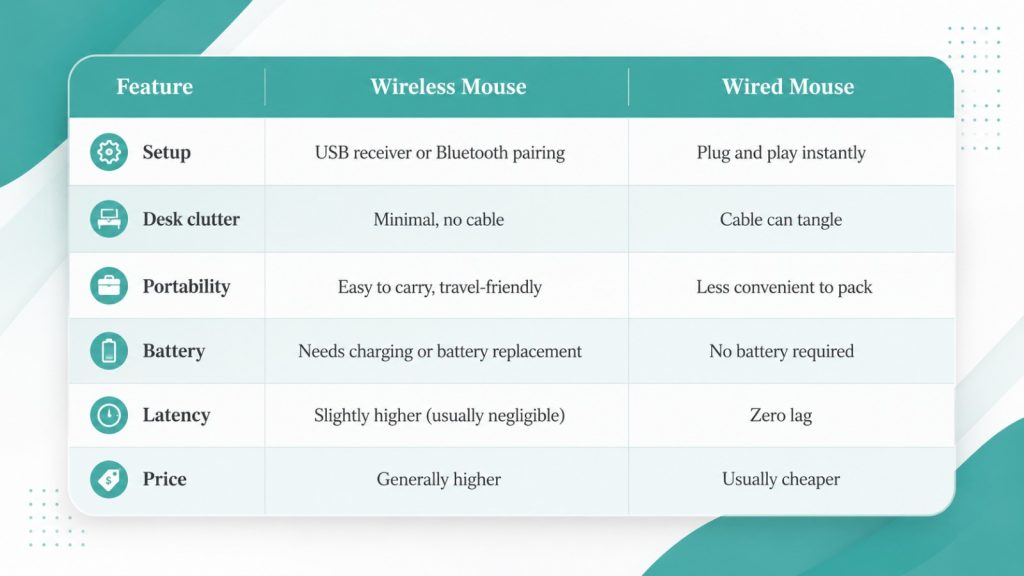
For most everyday users, students, and office professionals, the convenience of wireless outweighs the minor trade-offs. Serious competitive gamers may still prefer wired mice for the absolute lowest latency, though modern wireless gaming mice have closed that gap significantly.
How to Choose the Best Wireless Mouse
With so many options, here’s how to narrow it down based on how you’ll actually use it:
- For office and everyday use: Prioritize comfort, battery life, and dual-mode connectivity over flashy extras.
- For gaming: Look for adjustable DPI, low latency, and a reliable sensor built for fast movements.
- For students: A compact, lightweight, budget-friendly model that’s easy to carry between classes.
- For graphic designers: Higher DPI precision and an ergonomic shape matter more here, since you’ll be using it for extended, detail-heavy sessions.
Things to Consider Before Buying
Before you finalize your purchase, run through this quick checklist:
- Connectivity type — 2.4GHz USB receiver, Bluetooth, or dual-mode?
- Battery type — replaceable batteries or built-in rechargeable?
- DPI range — higher DPI means more sensitivity, useful for gaming or design work.
- Ergonomics — does the shape suit your hand size and grip style?
- Build quality and warranty — is it backed by a genuine warranty from an authorized seller?
- Compatibility — does it work with your operating system (Windows, macOS, Linux)?
- Bulk pricing — if buying for an office, ask about corporate or wholesale rates.
Where to Buy Genuine Wireless Mouse in Pakistan
Price is only half the equation — where you buy from matters just as much. Look for suppliers that offer:
- Genuine products with proper manufacturer backing, not clone or counterfeit units
- Warranty coverage so you’re protected if something goes wrong
- Bulk order and corporate sales support for offices, schools, and businesses needing multiple units
- Reliable nationwide delivery so you’re not stuck waiting weeks for a simple accessory
As one of Pakistan’s established IT wholesalers, Awais International supplies genuine accessories alongside laptops and other hardware, backed by proper warranty and support — useful if you’re also exploring options like HP laptops in the Rs. 20,000–30,000 range, browsing top laptops under Rs. 100,000, or even looking into a 3D printer for a home or office project. If you’re specifically after HP hardware, it also helps to buy through authorized HP partners in Lahore to guarantee authenticity.
Frequently Asked Questions
Which wireless mouse is best?
It depends on your use case. HP and Lenovo mice are excellent for everyday office work, Dell offers strong battery life for professionals, and Apple’s Magic Mouse is best if you’re fully in the macOS ecosystem.
Is HP wireless mouse worth buying?
Yes. HP wireless mice offer a reliable balance of price, build quality, and features like dual-mode connectivity, making them a solid choice for most everyday users.
Which wireless mouse has the longest battery life?
Mice with rechargeable batteries and efficient power management, like several HP and Dell models, tend to offer longer battery life compared to basic entry-level mice that rely on standard AA batteries.
How do I connect a wireless mouse to my laptop?
For 2.4GHz models, plug the small USB receiver into your laptop’s USB port and the mouse should connect automatically. For Bluetooth models, turn on Bluetooth in your laptop’s settings, put the mouse into pairing mode, and select it from the list of available devices.
Can I use a wireless mouse for gaming?
Yes. Many modern wireless mice, including budget-friendly dual-mode models, offer latency low enough for casual and even competitive gaming, especially at the mid-range and above.
Final Thoughts
A wireless mouse might seem like a small purchase, but choosing the right one makes a real difference in your daily comfort and productivity. Whether you’re after an affordable HP option, a dependable Dell or Lenovo model, or a premium Apple mouse, matching the mouse to your actual use case — office work, gaming, studying, or design — is more important than chasing the cheapest price tag.
Ready to upgrade your setup? Explore genuine wireless mice and other IT accessories from Awais International, and reach out for bulk or corporate pricing if you’re outfitting an entire office.